
Every video editor makes the same assumption: you already know where the good parts are.
You open a timeline. You scrub. You watch. You find something promising, mark it, keep scrubbing. A 90-minute recording turns into a 2-hour editing session before you’ve made a single cut.
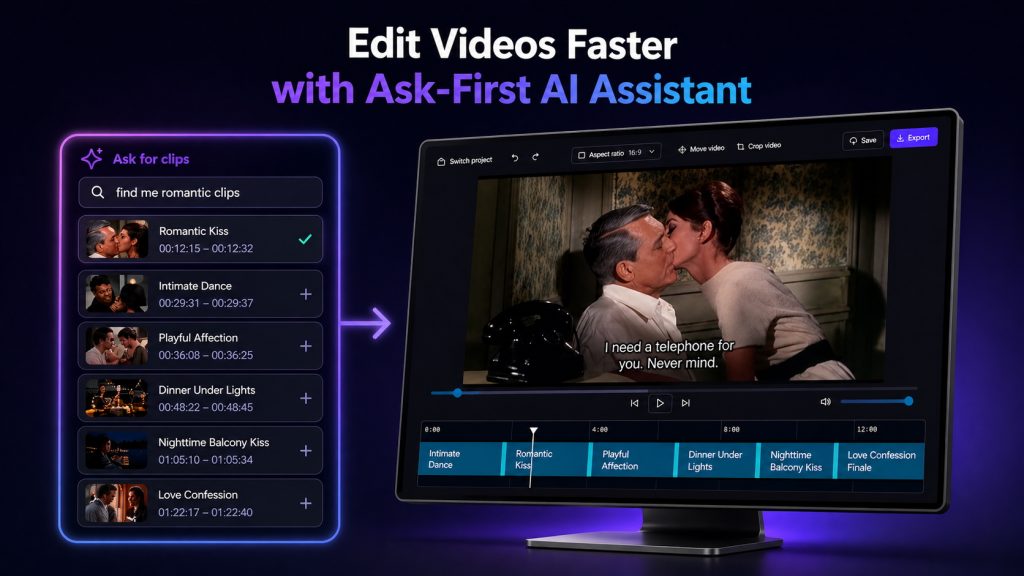
We’ve always thought there should be a step before the timeline. A step where you ask the AI what’s in the video and it tells you — with clips, not just text. Today we’re shipping that idea as a complete editing workflow inside Valossa Assistant.
We’re calling it ask-first editing.
Start with a question, not a timeline
The workflow starts in the same place Valossa Assistant has always worked: a conversation. Upload a video, and the AI watches it across seven modalities — speech, visuals, audio events, on-screen text, faces, moods, and structure. Then you ask for what you need.
“Find the 3 strongest moments.” “Show me where they present the conclusions.” “Pull every clip where someone mentions the product name.”
The AI returns clips. You review them, and the ones you want go into your Edit Basket — a collection point that lives alongside everything you do in the app. Clips can come from conversations, search results, or AI reports. They all land in the same place.
When you’re ready, one click takes your Edit Basket to the editor.
If you’re new to Valossa Assistant, read how the conversational video AI works — the editor builds on top of everything described there.
A real editor, with a shortcut
The editor is a real timeline. You can arrange clips, reorder them, trim, split, and preview your assembly. It’s visual, it’s direct, and it gives you the control you’d expect.
But here’s the part we’re most excited about: the “Ask for clips” panel inside the editor. Without leaving your edit session, you can ask the AI for more clips. Describe what you need, and new clips appear in the right panel. Drag them into your timeline.
This is the core of ask-first editing — discovery and editing aren’t separate activities anymore. You can go back and forth between asking and assembling as many times as you need.
Cut by words, not by waveforms
The editor includes text-based editing. Below the video player, you see the transcript. Select the words you want to cut, and the editor removes that section. No dragging edges on a waveform. No guessing where the sentence ends.
There’s also automatic silence removal. One click scans for dead air and pauses, then tightens the pacing across your entire project. For anyone who’s spent time manually trimming silence from interview footage or podcast recordings, this alone changes the workflow.
Extract and export any clip — in any format
Export formats cover the places video goes today: 16:9 landscape for YouTube and presentations, 9:16 portrait for Reels, Shorts, and TikTok, and 1:1 square for Instagram.
Each clip can be cropped independently — portrait, landscape, square, or free crop. When you export the project, every clip keeps its own crop settings within the project-level aspect ratio. So a multi-clip assembly can mix clips from different camera angles or scenes, each framed the way it needs to be, and export as one coherent video.
Captions are built in. Add subtitles per clip, correct the text, adjust timings, and set automatic pacing optimized for landscape or portrait viewing. Style with templates, font size, position, and text/outline colors. Burn captions into the video on export, or download SRT/VTT subtitle files for your publishing platform — or both.
Who this is for
If you work with video professionally — editing client footage, repurposing webinars, creating social clips from long-form content, screening recordings for compliance — ask-first editing means you spend less time hunting for moments and more time assembling them.
It’s particularly useful when you’re working with long recordings where you know there’s good material somewhere but finding it has always been the bottleneck.
Try it now
The Ask-First Video Editor is live in Valossa Assistant today. Your free trial includes full access with AI video analysis — including the powerful new editor. No credit card required.